EXPOBAR
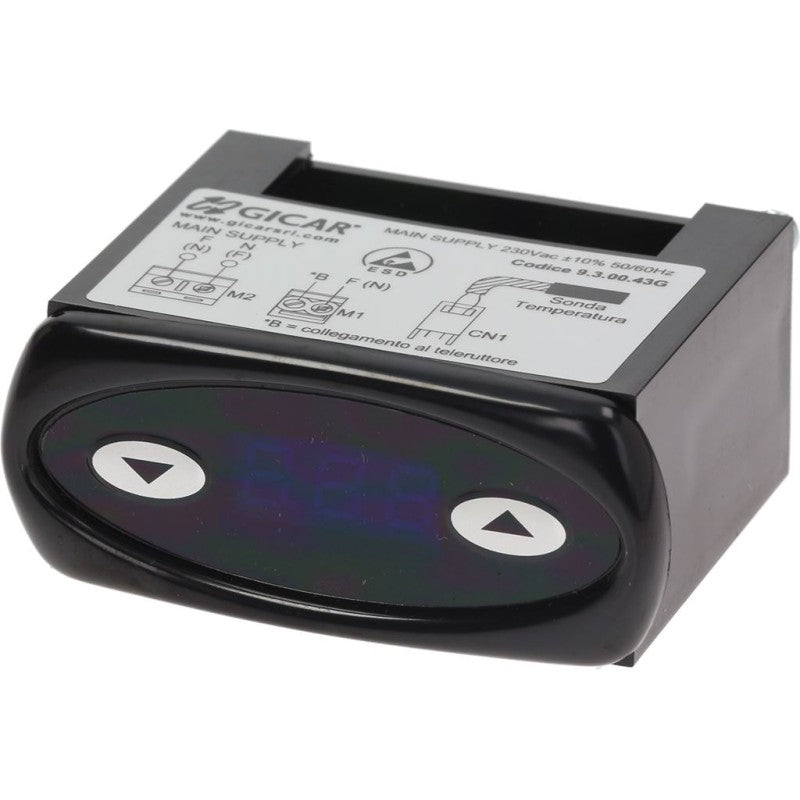
Expobar / Crem Termopid Digital Thermostat – 230V
Expobar / Crem Termopid Digital Thermostat – 230V
SKU:
In stock
Couldn't load pickup availability
230V Termopid digital thermostat listed for selected Crem and Coffee Queen coffee machines, supplied under this store's Expobar parts range. Check the original controller's label, connections and configuration before ordering.
Specifications
- Component: Termopid digital thermostat / electronic controller
- Listed voltage: 230V
- Body dimensions: 62 × 29 × 52 mm
- Frame dimensions: 70 × 31 mm
Listed compatibility
- Crem: Diamant, G-10 / G10, New Elegance, Office
- Coffee Queen: Office-Leva
Confirm your machine version, controller reference, electrical connections, sensor requirements and configuration with a qualified technician. Matching dimensions or model name alone does not establish interchangeability. Contact Bear Coffee Machine with your machine details and clear photos of the original controller label for help.
Frequently asked questions
Which machines is this controller listed for?
The supplied compatibility list names Crem Diamant, G-10 / G10, New Elegance and Office, plus Coffee Queen Office-Leva. Other models and production versions require confirmation.
What are its dimensions?
The body measures 62 × 29 × 52 mm and the frame measures 70 × 31 mm. Check mounting clearance against the original unit.
What voltage is listed?
This listing specifies 230V. Have a qualified technician verify the original unit's rating and wiring before installation.
Does a temperature fault mean the controller needs replacing?
No. A display or temperature-control fault does not identify the failed component by itself. Have the controller, sensor, supply and wiring diagnosed before ordering parts.
Does it require setup?
Required settings and sensor compatibility are not specified in the supplied listing. A qualified technician should confirm configuration, install the controller and test the machine. Disconnect power and allow the machine to cool before servicing; never bypass safety devices.
Share